
CO2 vs Fiber Laser Machine: Which Is Right for Wood, Acrylic, Metal & Plastic?
The short answer: choose a fiber laser if you mainly mark or engrave metals, and a CO2 laser if you mainly work with wood, acrylic, leather, paper, fabric or glass. Plastics sit in the middle and depend on the exact material. This guide compares the two technologies material by material, covers MOPA and UV options, and lists what to check before you buy a laser marking or engraving machine in India.
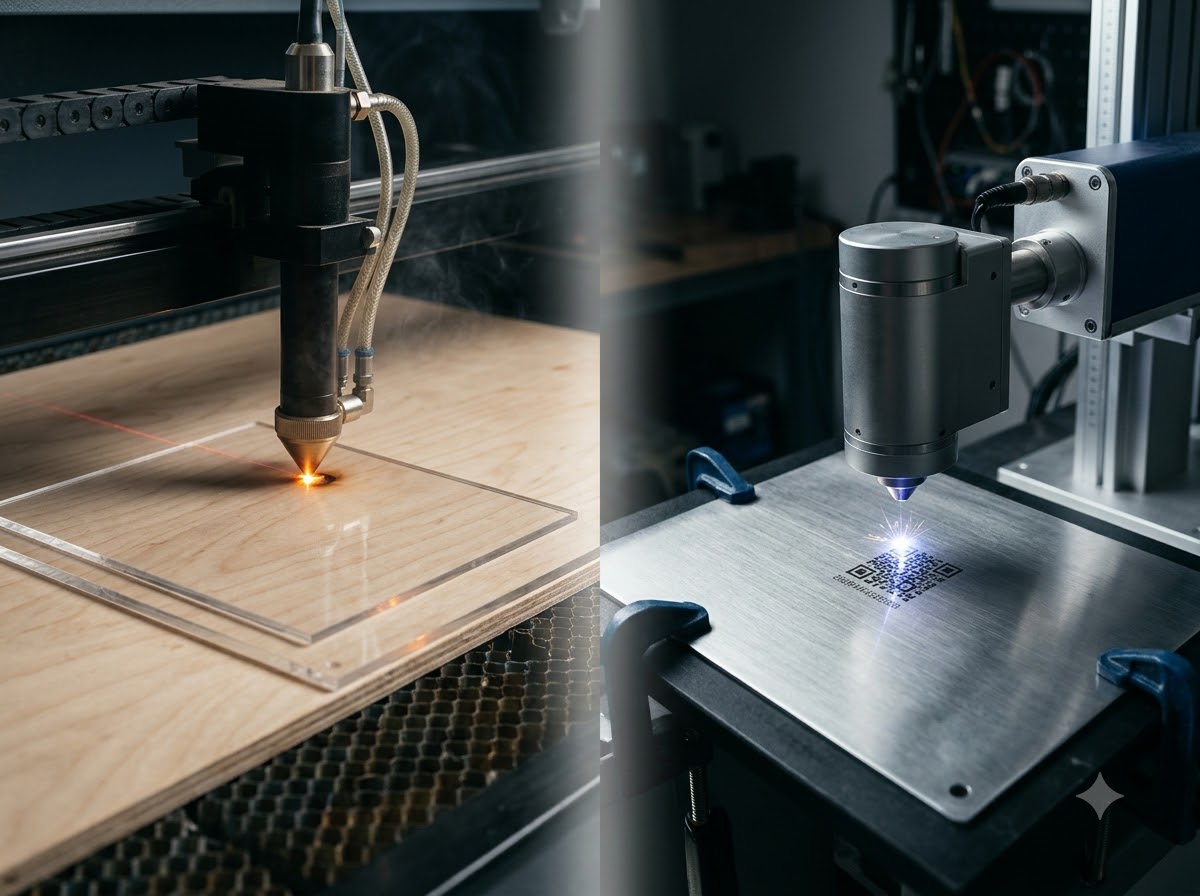
At Success Technologies, we manufacture laser marking and engraving machines in Ahmedabad for Indian industry. The most common question we hear from new buyers is whether they need a CO2 or a fiber machine. Buying the wrong type is an expensive mistake, because the two lasers are not interchangeable. The sections below explain why, and where sample testing on your own material matters.
CO2 vs Fiber Laser: The Core Difference
Both machines use a focused laser beam, but they produce light at very different wavelengths, and materials absorb each wavelength differently.
- CO2 laser: A gas laser that emits far-infrared light at about 10.6 micrometres. Organic and non-metallic materials such as wood, paper, leather, fabric, acrylic and glass absorb this wavelength well.
- Fiber laser: A solid-state laser that emits near-infrared light at about 1.06 micrometres, delivered through an optical fibre. Metals absorb this wavelength well, which is why fiber lasers dominate metal marking.
That one fact explains most of the comparison below. A material the laser does not absorb will either not mark at all or give poor, inconsistent results, no matter how much power you add.
Which Laser Works on Which Material?
Use this table as a starting point. Alloys, coatings, colours and thickness all change the outcome, so confirm with sample marking on your own material.
| Material | CO2 laser | Fiber laser |
|---|---|---|
| Wood, MDF, plywood | Well suited: engraving and cutting | Not recommended |
| Acrylic | Well suited: engraving and cutting with clean edges | Not recommended, especially clear acrylic |
| Bare metals (steel, aluminium, brass, silver) | Poor on bare metal | Well suited: permanent marking and engraving |
| Coated or anodised metal | Can mark the coating | Well suited |
| Plastics | Suits many plastics; varies by type | Can mark some engineering plastics; varies by type |
| Leather, paper, fabric, cardboard | Well suited | Not recommended |
| Glass, ceramic, stone surface | Surface engraving possible | Generally not the first choice |
For large stone and marble carving, a laser is not the usual tool. Those jobs are normally done on a CNC stone router. Our CNC router machine range covers that work.
Laser Engraving Machine for Wood
If you are looking for a laser engraving machine for wood, a CO2 laser is the right technology. Wood absorbs the CO2 wavelength readily, so the beam burns a clean, dark mark or cuts through thin sheets. Typical uses include name plates, signage, gifts, inlay pieces, models and decorative panels.
Results vary by wood type. Dense hardwoods engrave with a crisp, dark contrast, while resinous or open-grain woods can give uneven results. Plywood glues can also change how the sheet cuts. Test each wood and thickness you plan to use, and use proper extraction because wood produces smoke and residue.
Acrylic: Why CO2 Is the Usual Choice
Acrylic is one of the best materials for a CO2 laser engraving machine. The laser melts and vaporises the surface for frosted engraving, and it can cut sheets with smooth, polished edges. This suits sign letters, awards, display stands, keychains and light diffusers.
A fiber laser is a poor fit here. Clear acrylic is largely transparent to the fiber wavelength, so the beam passes through without a clean cut or engraving. If acrylic is a major part of your work, choose CO2.
Metal: Fiber Laser Marking and Engraving
For metal, a fiber laser marking machine is the standard choice. It makes permanent, high-contrast marks on stainless steel, mild steel, aluminium, brass, copper and other metals, including logos, serial numbers, QR and data matrix codes and scales. A CO2 laser cannot match this on bare metal.
Choosing Between 20W, 30W, 50W and 100W
Higher wattage gives more headroom for deeper engraving and faster marking, but more power is not automatically better.
| Power | Typically suited to | Consider |
|---|---|---|
| 20W | Surface marking, serial numbers, small logos | Slower for deeper engraving |
| 30W | General industrial marking with light engraving | A common balance of detail and speed |
| 50W | Deeper engraving and higher throughput | Settings need care on thin parts |
| 100W | Deep engraving on moulds and dies, heavy-duty marking | Often more than light marking needs |
These ranges are general guidance, not guarantees. Source type, pulse settings and lens also affect results, so ask for sample marking at the power you plan to buy. For round items such as rings, shafts and bangles, a rotary attachment turns the part while the laser marks, so check the diameter range against your products. If you work with precious metals, see our jewellery laser marking machine guide.
MOPA Fiber Laser for Colour Marking on Steel
A standard fiber laser gives mostly dark or light marks. A MOPA fiber laser marking machine offers adjustable pulse duration, which gives finer control over heat input. This allows colour marking on stainless steel, high-contrast black marks on anodised aluminium and more controlled marking on some plastics. It suits buyers who need decorative colour effects or very fine marking, and it usually costs more than a standard fiber source.
Cutting Metal Is a Different Machine
Marking and cutting are different jobs. A fiber laser marking machine is not built to cut sheet metal. For that, look at a fiber laser cutting machine.
Plastic: It Depends on the Plastic
Plastics are where the CO2 versus fiber question has no single answer, because "plastic" covers many materials that behave differently.
- CO2 laser: Suits many plastics for cutting and engraving, such as acrylic (PMMA), and is often used for sheet plastics and some films.
- Fiber or MOPA laser: Can mark some engineering plastics, often for part numbers and codes, though contrast depends on the additives in the plastic.
- UV laser: A UV laser marking machine works with very little heat, so it suits fine marking on heat-sensitive plastics, glass and some packaging materials. It is a specialised option and usually costs more.
Safety warning: Do not laser-process PVC or other chlorine-containing materials. They release corrosive and harmful fumes that can injure operators and damage the machine. Check the safety data for any unfamiliar plastic before testing it, and always use proper fume extraction.
CO2 vs Fiber Laser: Side-by-Side Comparison
| Factor | CO2 laser | Fiber laser |
|---|---|---|
| Wavelength | About 10.6 µm | About 1.06 µm |
| Best for | Wood, acrylic, leather, paper, fabric, glass | Metals and some engineering plastics |
| Cutting thin non-metals | Yes | Not suited |
| Permanent marking on bare metal | Poor | Excellent |
| Cooling | Often water cooling or a chiller | Air cooled in many marking models |
| Maintenance | Mirrors, lens and tube or source care | Generally lower; keep the lens clean |
| Source life | Varies by tube type and use | Generally long; confirm with the manufacturer |
Source life and maintenance vary by model and use, so ask the manufacturer for the expected service life and what is covered under warranty rather than relying on general figures.
Portable, Desktop and Enclosed Options
Beyond the laser type, the machine format matters for your workshop.
- Desktop fiber laser marking machine: A compact bench-top unit for small parts, tags and jewellery-size work.
- Portable or handheld laser marking machine: Useful when the part is too large or awkward to move to the machine. Confirm the safety measures, because a handheld unit needs strict operator controls.
- Enclosed machine: The laser is inside a protective cabinet, which supports operator safety in shared workshops.
- Split-type machine: The laser source is separate from the marking head, which gives more flexibility for fixtures and larger setups but needs proper protective eyewear and controlled access.
Whichever you choose, follow the laser safety class guidance supplied with the machine and use fume extraction.
Laser Machine Price in India: What Affects the Cost?
There is no single price for a laser marking or engraving machine, because configurations vary widely. The factors that most affect a quotation are:
- Laser type and source: CO2, fiber, MOPA or UV, plus source brand.
- Power: Higher wattage generally costs more.
- Working area: Table size for CO2, lens and field size for fiber.
- Attachments: Rotary, lifting table or special fixtures.
- Enclosure and cooling: Enclosed or split-type, air or water cooling.
- Software: Design features, language support and file compatibility.
- Installation and training: Whether they are included.
- Warranty and after-sales service: Duration, coverage and response process.
Compare quotations on the same configuration and ask what is included. To get a price for your requirement, request a quotation with your material, size and marking needs.
How to Choose: A Quick Decision Guide
- You mark or engrave metal parts, tools, jewellery or moulds: choose a fiber laser, and add a rotary if your parts are round.
- You need colour or very fine marking on steel or plastic: consider a MOPA fiber laser.
- You work with wood, acrylic, leather or paper: choose a CO2 laser.
- You mark heat-sensitive plastics or glass: ask about UV and test samples.
- You work with both metals and non-metals: you may need two machines, since a single laser rarely does both well.
How to Choose a Laser Machine Manufacturer in India
- Sample marking demonstration: Ask them to mark your own material and review the result under magnification.
- Technical support: Confirm who supports you after installation and how.
- Warranty and spare parts: Ask what is covered, for how long, and how quickly parts are available.
- Training: Your operators should learn software and parameter setting.
- Specifications in writing: Get laser type, power, working area, attachments and safety features documented.
- Transparent quotation: Each item should be listed, with clear terms for delivery and installation.
Success Technologies has been a laser marking machine manufacturer in Ahmedabad since 2013, and our team can discuss configurations for your material.
Frequently Asked Questions
Which is better, a CO2 laser or a fiber laser?
Neither is better for everything. A fiber laser is the right choice for marking and engraving metals, while a CO2 laser is the right choice for wood, acrylic, leather, paper, fabric and glass. The deciding factor is the material you work with most.
Can a fiber laser engrave wood or acrylic?
Not reliably. The fiber laser wavelength is poorly suited to most organic and transparent materials, so results on wood are limited and clear acrylic largely lets the beam pass through. A CO2 laser is the usual choice for these materials.
Can a CO2 laser mark metal?
A standard CO2 laser does not mark bare metal well. It can mark coated or anodised metal surfaces, and it can be used with special marking compounds, but for permanent marking on bare steel, aluminium, brass or silver a fiber laser is the better option.
Which laser is best for plastic?
It depends on the plastic and the result you want. CO2 suits many plastics for cutting and engraving, fiber and MOPA lasers can mark some engineering plastics, and UV lasers give fine, low-heat marks on sensitive plastics. Sample testing on your own material is the safest way to decide.
What factors affect laser machine prices in India?
Price depends on the laser type and source brand, power rating, marking or working area, rotary or other attachments, enclosure type, software, cooling system, installation and training, warranty and after-sales service. Because configurations vary, a written quotation based on your requirement is the accurate way to compare.
Is PVC safe to cut or engrave with a laser?
No. PVC and other chlorine-containing materials release corrosive and harmful fumes when heated by a laser, which can injure operators and damage the machine. Do not process them. Check the safety data for any unfamiliar plastic before testing it.
Conclusion: Match the Laser to Your Material
The CO2 vs fiber decision comes down to your material. Fiber lasers are the dependable choice for metal marking and engraving, CO2 lasers are the dependable choice for wood, acrylic and other organic materials, and plastics need testing. Define your materials, mark size and volumes first, then confirm the result with sample marking before you buy.
If you are evaluating a machine for your workshop, explore our fiber laser marking machine and laser engraving machine range, then request a quotation or sample marking demonstration, or message us on WhatsApp.