
3 Axis vs 4 Axis vs ATC CNC Router: Choosing the Right Configuration for Your Workshop
The short answer: choose a 3 axis CNC router for flat and relief work, a 4 axis CNC router if you need to carve round or cylindrical items, and an ATC CNC router machine if your jobs use several tools or you run repeat production. These are not competing technologies: 3 axis and 4 axis describe how the machine moves, while ATC describes how it changes tools, and you can combine them. This guide explains each, compares them side by side and lists what to check before you buy a CNC router in India.
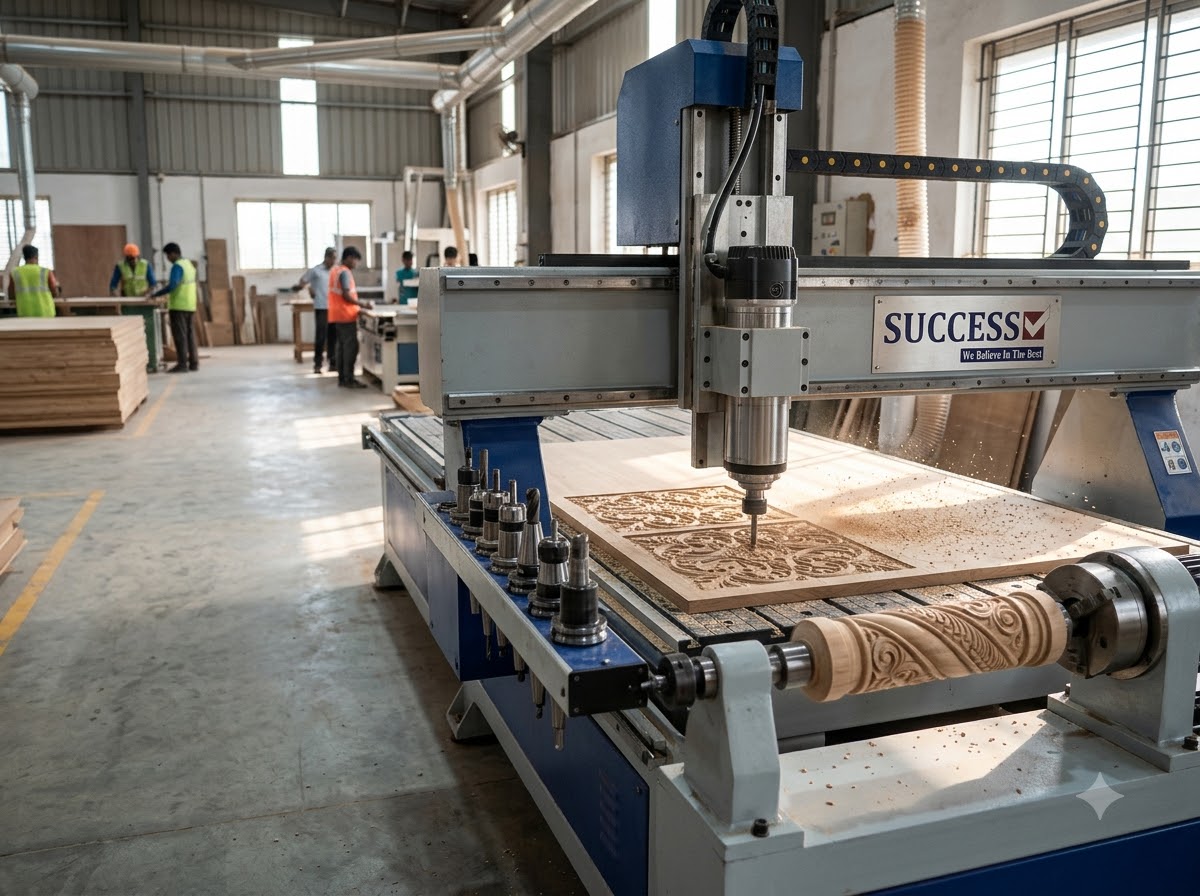
At Success Technologies, we manufacture CNC router machines in Ahmedabad for wood, acrylic, aluminium composite panels, foam, stone and other materials. Buyers often ask us which configuration to pick, and the right answer depends on the shapes you make, the number of tools each job needs and your production volume.
What Do 3 Axis, 4 Axis and ATC Mean?
- 3 axis: The cutting tool moves along X (length), Y (width) and Z (depth).
- 4 axis: A fourth, rotary axis (often called the A axis) turns the workpiece around its own length while the tool cuts.
- ATC (automatic tool changer): A tool magazine and holder system that swaps cutters automatically during a program. ATC is a tool-handling feature and can be fitted to 3 axis machines as well.
3 Axis CNC Router: The Standard Workhorse
A 3 axis CNC router is the most common configuration and the right starting point for most workshops. It cuts, engraves and carves from one side of a flat sheet or block.
- Typical jobs: signage, nameplates, panels, furniture parts, doors, jali patterns, relief carving, moulds and 2.5D work.
- Materials: wood, MDF, plywood, acrylic, composite panels, foam, plastics and soft non-ferrous metals, depending on the machine's rigidity and spindle.
- Limit: It cannot machine fully round parts, and sides or undersides need the workpiece to be flipped and re-aligned.
4 Axis CNC Router: Adding Rotary Carving
A 4 axis CNC router adds a rotary axis, so the workpiece spins while the tool carves around it. This opens up work a flat-bed 3 axis machine cannot do in one setup.
- Typical jobs: pillars and columns, table and sofa legs, balusters, bed posts, rolling pins, handles, round idols and cylindrical decorative pieces.
- Check: The maximum diameter and length the rotary can hold, and whether it is a rotary attachment or a fully integrated fourth axis.
- Not the same as 5 axis: A 4 axis machine does not tilt the tool, so deep undercuts and complex multi-sided shapes may still need repositioning.
ATC CNC Router Machine: Automatic Tool Changing
On a manual machine, the operator stops the job to swap each cutter and reset the tool length. An ATC CNC router machine does this automatically from a tool magazine. Typical systems are a linear (rack) magazine or a disc or carousel magazine; capacity and layout vary by model.
- Why it helps: One program can rough, finish, drill and engrave with different tools without stopping, which saves operator time and reduces tool-change errors.
- Best for: furniture and door production, nested sheet cutting, mould work and any job that needs three or more tools.
- Trade-offs: Higher machine cost, more tool holders to buy and a bit more setup discipline. For single-tool jobs in small volumes the benefit is limited.
3 Axis vs 4 Axis vs ATC: Side-by-Side Comparison
| Factor | 3 axis | 4 axis | ATC |
|---|---|---|---|
| What it adds | X, Y, Z movement | Rotary axis for round work | Automatic tool changing |
| Best for | Flat and relief work | Cylindrical and round items | Multi-tool and repeat jobs |
| Tool change | Manual unless ATC fitted | Manual unless ATC fitted | Automatic |
| Setup complexity | Lowest | Needs rotary alignment and suitable CAM | Needs tool library and holders |
| Relative cost | Base configuration | Higher than base | Higher than base |
| Can be combined? | Yes, with ATC | Yes, with ATC | Yes, with 3 or 4 axis |
Which Configuration Suits Your Work?
- Signage, panels, doors and flat furniture parts: a 3 axis CNC router, with ATC if you change tools often.
- Round furniture legs, pillars, balusters and idols: a 4 axis CNC router.
- Batch production with several tools per job: an ATC CNC router machine.
- Moulds, patterns and 3D surfaces: a rigid machine with the right spindle and software; see our CNC mould and die making machine.
- Mixed engraving and routing: see the CNC engraving and router machine.
- Stone and marble carving: stone needs a much more rigid machine, water handling and suitable tooling, so discuss your stone type with us before choosing a standard wood router configuration.
What Else Affects CNC Router Machine Price in India?
Axis count and ATC are only part of the cost. The factors that most affect a quotation are:
- Working area: The table size, such as 4x8 feet or larger.
- Spindle: Power, cooling type and speed range.
- ATC details: Magazine type, tool capacity and holder standard.
- Drives and control: Motors, controller and software compatibility.
- Work holding: Vacuum table, pumps or clamping.
- Dust extraction: Essential for wood, MDF and composite panels.
- Installation, training and warranty: Duration, coverage and service response.
Compare quotations on the same configuration and ask what is included. To get a price for your requirement, request a quotation with your material, job size and daily volume.
How to Choose a CNC Router Manufacturer in India
- Sample cutting demonstration: Ask them to run your own material and design.
- Specifications in writing: Axes, ATC type, spindle, working area and accessories documented.
- Training and support: Software, tool setup and who supports you after installation.
- Spare parts and warranty: What is covered and how quickly parts arrive.
- Room to upgrade: Ask whether a rotary or ATC can be added later.
Success Technologies has been a CNC router manufacturer in Ahmedabad since 2013, and our team can discuss configurations for your material and volumes.
Frequently Asked Questions
What is the difference between a 3 axis and a 4 axis CNC router?
A 3 axis CNC router moves the tool along X, Y and Z and suits flat and relief work. A 4 axis CNC router adds a rotary axis that turns the workpiece, so it can carve cylindrical and round items such as pillars, legs and balusters.
What does ATC mean in a CNC router machine?
ATC stands for automatic tool changer. An ATC CNC router swaps cutting tools automatically from a tool magazine during a job, so the operator does not have to stop the machine and change tools by hand.
Is an ATC CNC router worth it?
It is worth considering if your jobs use several different tools, such as roughing, finishing, drilling and engraving, or if you run repeat production. If you mostly run single-tool jobs in small volumes, a manual tool-change machine may be enough.
Can a 3 axis CNC router do 3D carving?
Yes, within limits. A 3 axis machine can carve 3D relief surfaces from one side of a flat workpiece. It cannot machine the sides or underside of a part without repositioning it, and it cannot carve fully round items without a rotary axis.
What factors affect CNC router machine price in India?
Price depends on the number of axes, working area, spindle power and type, ATC and tool magazine capacity, drive and control system, vacuum table or clamping, dust extraction, software, installation and training, and warranty and service. A written quotation for your requirement is the accurate way to compare.
Conclusion: Match the Configuration to Your Jobs
Start from the work you actually do. Flat and relief jobs point to 3 axis, round parts point to 4 axis, and multi-tool or repeat production points to ATC. Define your materials, job sizes and volumes first, then confirm with a sample cut before you buy.
Explore our CNC router machine range, then request a quotation or sample cutting demonstration, or message us on WhatsApp.